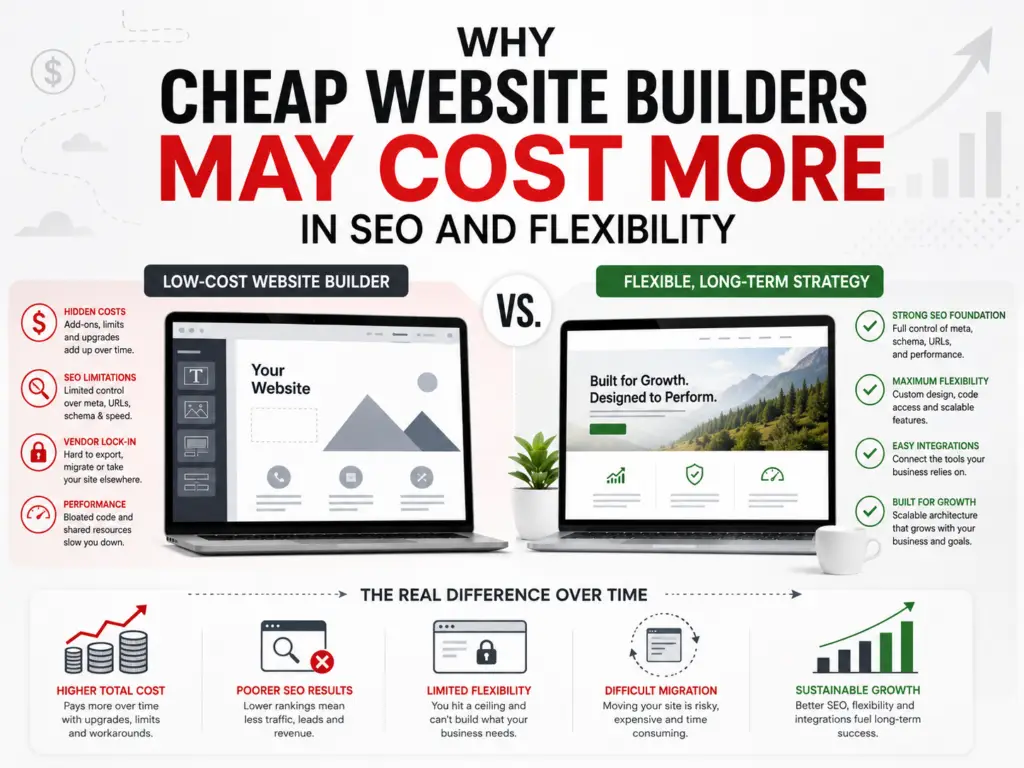
An inexpensive website builder can look like an attractive option for a small business.
The monthly price may be low, templates are readily available, and the promise of launching a website quickly can be appealing. For a new business with a limited budget and simple needs, that may be enough to get started.
However, the lowest upfront price does not always produce the lowest long-term cost.
As the business grows, the website may need better search visibility, additional service pages, structured data, advanced forms, integrations, improved performance, stronger security, or a more customized design. At that point, the limitations of the original platform or plan may become more noticeable.
The issue is not that every low-cost website builder is bad. Many are capable of producing attractive and functional websites.
The better question is:
Will the platform still support your business when your needs become more complex?
What Is a Website Builder?
A website builder is a platform that helps people create websites using templates, visual editing tools, and built-in features.
Website builders often include:
- Website hosting
- Templates
- Drag-and-drop editing
- Basic search engine optimization settings
- Contact forms
- Image galleries
- Blogging tools
- Ecommerce options
- Domain connections
- Security certificates
- Technical platform maintenance
These tools can make it easier for someone without development experience to launch a website.
The tradeoff is that the business generally works within the platform’s available features, settings, templates, integrations, and pricing structure.
That may be perfectly acceptable for a simple website. It can become more restrictive when the business needs greater control.
Cheap Does Not Always Mean Poor Quality
It is important to be fair about inexpensive website builders.
A low-cost platform may be a reasonable choice when:
- The business needs only a few basic pages
- The website is temporary
- The site is not a major source of leads
- The business has a very limited startup budget
- Advanced integrations are not needed
- The owner is comfortable managing the site
- The available design and SEO features are sufficient
- The business understands the platform’s limitations
A basic website is often better than having no website at all.
The problem begins when a temporary or entry-level solution is expected to support a growing business indefinitely.
The Initial Price Is Only Part of the Cost
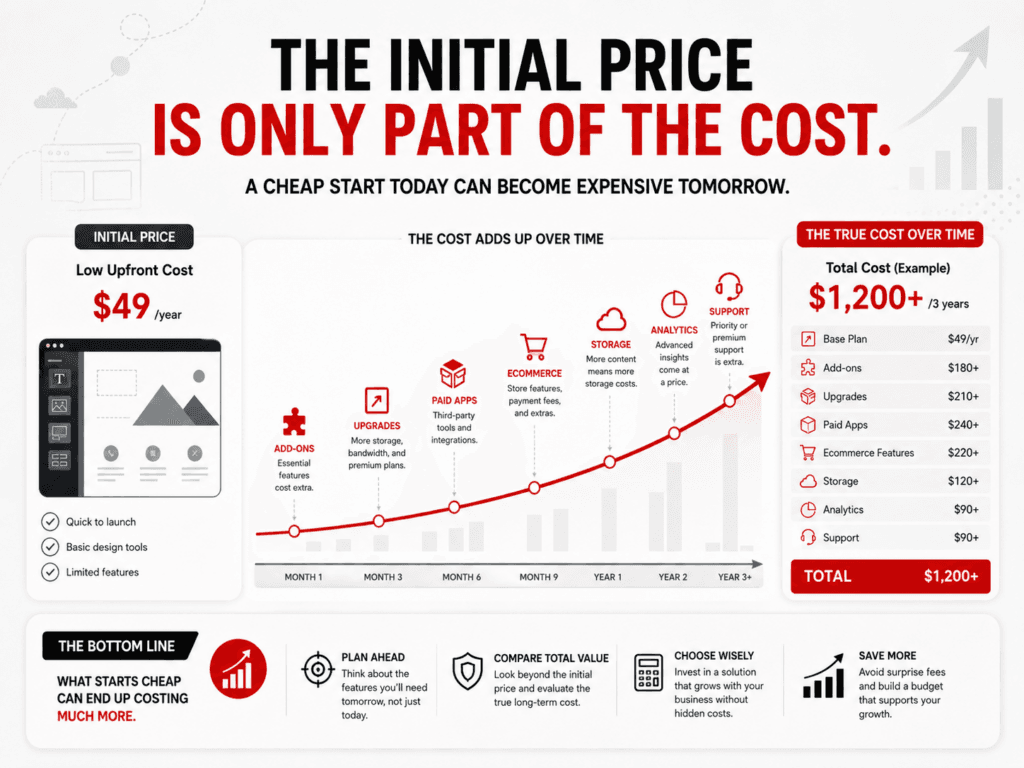
When comparing website platforms, business owners often focus on the advertised monthly fee.
However, the total cost of a website may also include:
- Premium templates
- Additional apps
- Ecommerce features
- Appointment scheduling
- Form upgrades
- Email marketing tools
- Extra storage
- Additional users
- Advanced analytics
- Custom domain features
- Professional setup
- Search engine optimization
- Content writing
- Accessibility tools
- Migration or rebuilding later
A platform that appears inexpensive at the beginning may become more costly as paid extensions and higher-tier plans are added.
The right question is not simply:
How much does this website cost per month?
A better question is:
What will this website need over the next several years, and what will it cost to support those needs?
SEO Requires More Than Editing a Page Title
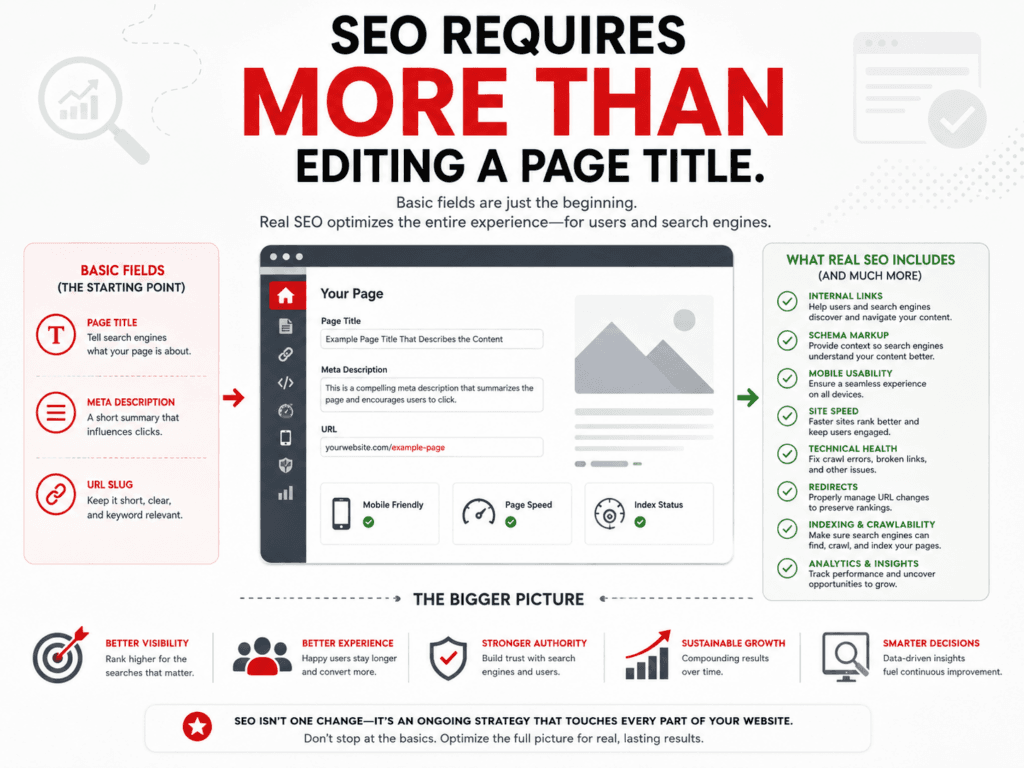
Most modern website builders offer at least basic SEO settings.
That may include:
- Page titles
- Meta descriptions
- Image alternative text
- Custom URLs
- Redirects
- XML sitemaps
- Mobile-friendly templates
- Basic structured data
- Search-engine verification
Those features are useful, but SEO involves more than filling in a few fields.
A complete SEO strategy may also require:
- A logical website structure
- Clear service pages
- Local landing pages
- Internal linking
- Crawlable navigation
- Schema markup
- Fast performance
- Technical troubleshooting
- Redirect management
- Canonical settings
- Indexing controls
- Content improvements
- Conversion tracking
- Integration with analytics and search tools
The issue is not always whether a platform has an SEO feature. The issue may be how much control the business or SEO professional has over that feature.
Limited SEO Controls Can Become Frustrating
A basic website builder may make common SEO tasks easy while limiting more advanced customization.
Depending on the platform and plan, limitations may involve:
- Automatically generated structured data
- Limited schema customization
- Restricted access to technical files
- Fixed page structures
- Limited redirect options
- Automatic URL formats
- Restricted template markup
- Limited control over scripts
- Limited server configuration
- Limited integration with specialized SEO tools
Many small businesses will not need every advanced option immediately.
However, when a technical issue appears or the SEO strategy becomes more sophisticated, the lack of control can make solving the problem more difficult.
Website Structure Still Matters
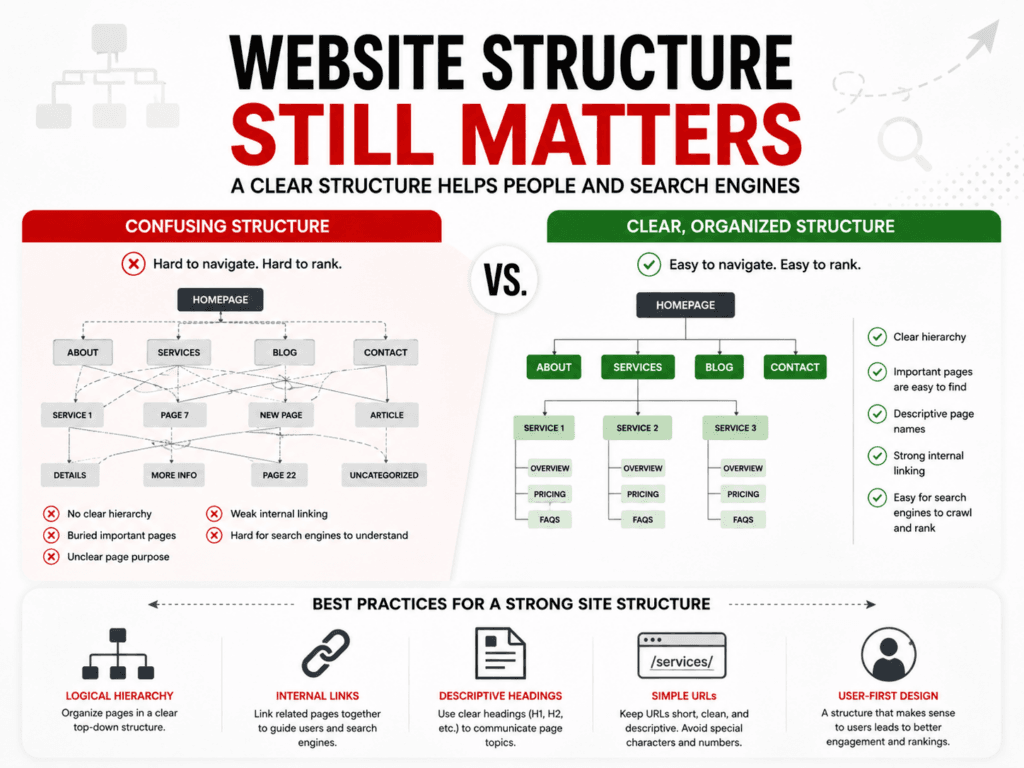
Search engines and visitors need to understand how the website is organized.
A strong structure usually includes:
- Clear navigation
- Descriptive page titles
- Logical service categories
- Crawlable internal links
- Simple URLs
- Related pages connected together
- Clear headings
- Useful calls to action
- A manageable number of pages
A template may look polished while still producing a confusing structure.
For example, important service information may be placed on one long homepage rather than being developed into individual service pages. That can make it harder to explain each service thoroughly and target different customer needs.
The platform should allow the website structure to evolve as the business grows.
Structured Data May Require Greater Control
Structured data can help search engines understand information about a business, article, service, product, event, or person.
Some website builders create certain structured data automatically. That can be helpful for basic sites.
However, a business may eventually need more control to:
- Correct inaccurate markup
- Add appropriate schema types
- Connect business entities
- Mark up specific services
- Improve article information
- Add location details
- Remove duplicate schema
- Coordinate plugin-generated and custom markup
Structured data does not guarantee rankings or special search features. It should accurately represent the visible content and support the broader website strategy.
A platform that limits schema customization may be sufficient now but restrictive later.
Local SEO Needs Clear, Expandable Content
Local businesses frequently need more than a homepage and contact page.
A growing local SEO strategy may include:
- Detailed service pages
- Location-focused content
- A complete contact page
- Service-area information
- Local case studies
- Frequently asked questions
- Original project examples
- Testimonials
- LocalBusiness structured data
- Internal links between services and locations
- Helpful blog content
A platform should make it easy to create, organize, connect, and update this content.
If adding new pages becomes difficult, inconsistent, or expensive, the website may not grow with the business’s Local SEO strategy.
Performance Can Depend on What the Platform Allows
Website speed is influenced by many factors, including:
- Image sizes
- Video embeds
- Fonts
- Scripts
- Third-party apps
- Template code
- Hosting resources
- Caching
- Content delivery
- Tracking tools
- Page design
Some hosted website builders manage much of the technical performance automatically. That can be an advantage.
However, if the website becomes slow, the owner may have limited access to the underlying system and fewer options for optimization.
With a more flexible platform, a qualified professional may be able to adjust hosting, caching, database behavior, scripts, image delivery, plugins, or code.
More control also creates more responsibility, but it can be valuable when performance becomes a priority.
Integrations May Determine How Far the Website Can Grow
A small business website may begin with a basic contact form.
Later, the business might need to connect the website with:
- Customer relationship management software
- Email marketing
- Appointment scheduling
- Payment processing
- Membership systems
- Online courses
- Inventory
- Accounting software
- Customer portals
- Marketing automation
- Analytics
- Review platforms
- Accessibility tools
- Industry-specific software
Before selecting a platform, review both current and likely future integrations.
A builder may offer an app for a particular function, but that does not always mean it will support the exact workflow the business needs.
If a required integration is unavailable, the business may need a workaround, a more expensive plan, or a completely different platform.
Design Flexibility Can Become More Important Over Time
Templates make it easier to launch a website quickly.
However, templates may also create design limits involving:
- Page layouts
- Headers and footers
- Navigation
- Mobile presentation
- Custom content types
- Advanced forms
- Dynamic content
- Product layouts
- Service-page layouts
- Conversion elements
- Accessibility improvements
At first, these restrictions may not seem important.
As the business develops its brand, content, services, and marketing strategy, a more customized design may become necessary.
A website should not only look professional. It should support how customers research, navigate, and take action.
Platform Ownership and Website Ownership Are Different
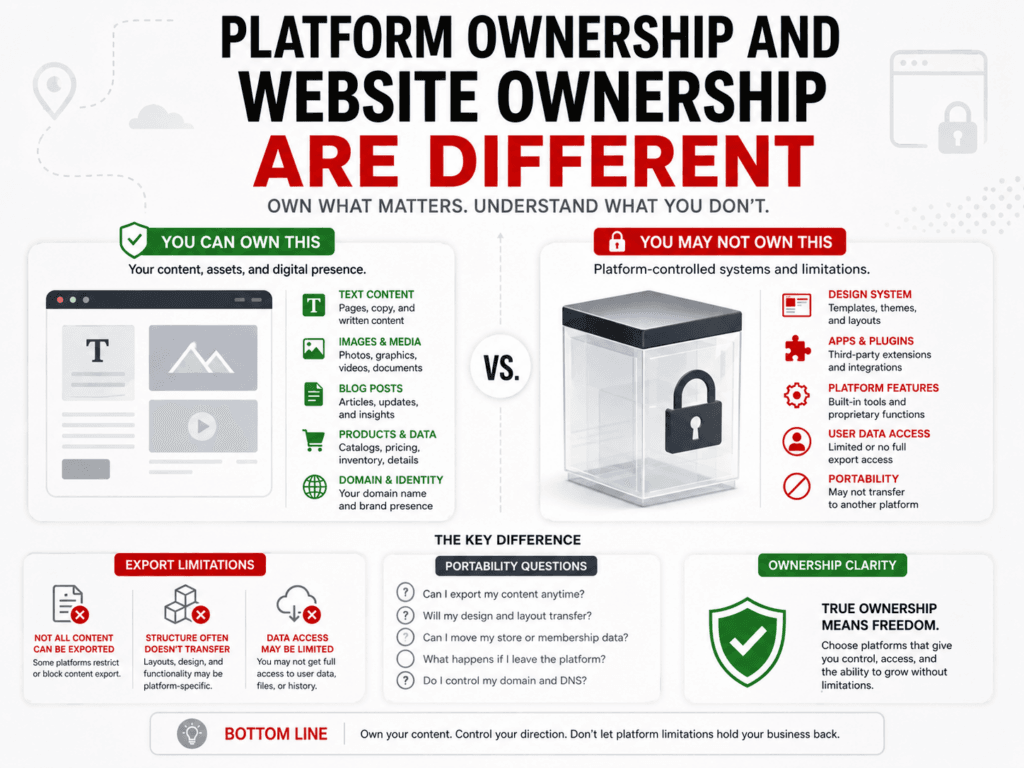
A business may own its written content, images, domain, and other materials while still depending on a platform’s proprietary system to display the website.
This distinction matters.
When a website is built inside a closed system, the complete design and functionality may not be transferable to another platform.
The business may be able to export certain content, such as:
- Blog posts
- Products
- Customer information
- Images
- Text
- Orders
However, the website’s exact design, templates, apps, settings, and functionality may not transfer.
Moving may require rebuilding the site rather than copying it.
Before selecting a platform, ask:
- What content can be exported?
- In what format is it exported?
- Are images included?
- Can blog posts be moved?
- Can product data be moved?
- Can form submissions be exported?
- Can the design be transferred?
- What happens to platform-specific apps?
- Can URLs and redirects be preserved?
- Who controls the domain?
These questions are much easier to address before the website is built.
Migration Can Be More Expensive Than Expected
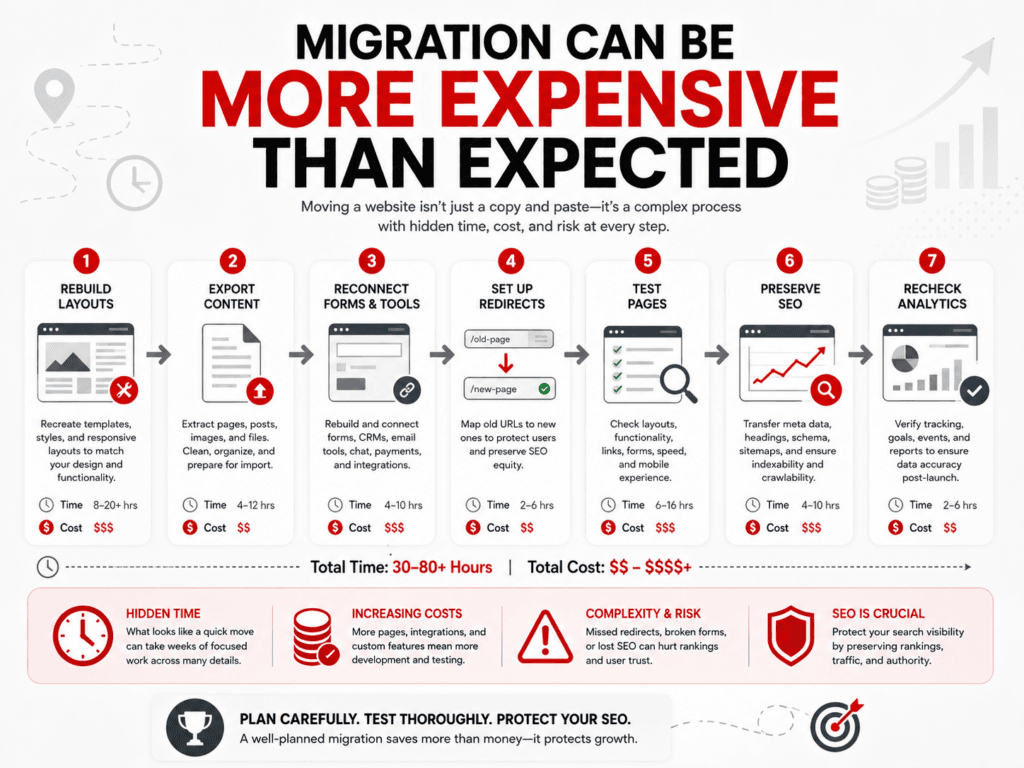
Moving a website involves more than copying text.
A proper migration may require:
- Rebuilding the design
- Recreating page layouts
- Exporting and importing content
- Downloading images
- Reconnecting forms
- Rebuilding integrations
- Recreating structured data
- Matching old URLs
- Creating redirects
- Reconfiguring analytics
- Reconnecting search tools
- Testing mobile layouts
- Checking accessibility
- Verifying forms and tracking
- Monitoring rankings after launch
If URL structures change without correct redirects, users and search engines may encounter broken pages.
Migration should therefore be treated as both a website project and an SEO project.
Rebuilding Later Can Erase the Original Savings
Suppose a business saves money by selecting the lowest-cost website option.
Two years later, the business needs:
- More service pages
- Better Local SEO
- Advanced forms
- Better performance
- Custom schema
- Improved conversion tracking
- A customer portal
- Integrations the original platform does not support
If the platform cannot accommodate those needs, the site may need to be rebuilt.
The business then pays for:
- The original website
- Temporary upgrades and workarounds
- Migration planning
- A replacement website
- SEO preservation and redirect work
The inexpensive website may still have been useful during the startup phase. However, it was not necessarily the least expensive long-term option.
Cheap Website Design Can Also Mean a Cheap Process
The platform is not the only consideration.
A very inexpensive website service may reduce the price by limiting:
- Discovery and planning
- Competitor research
- Keyword research
- Website architecture
- Original content
- Local SEO strategy
- Conversion planning
- Accessibility review
- Testing
- Mobile refinement
- Training
- Ongoing support
The business may receive a visually acceptable website without the strategy needed to support visibility and growth.
A website’s value depends on more than how many pages it includes. The process used to plan and build those pages matters.
WordPress Offers Flexibility, but It Also Requires Care
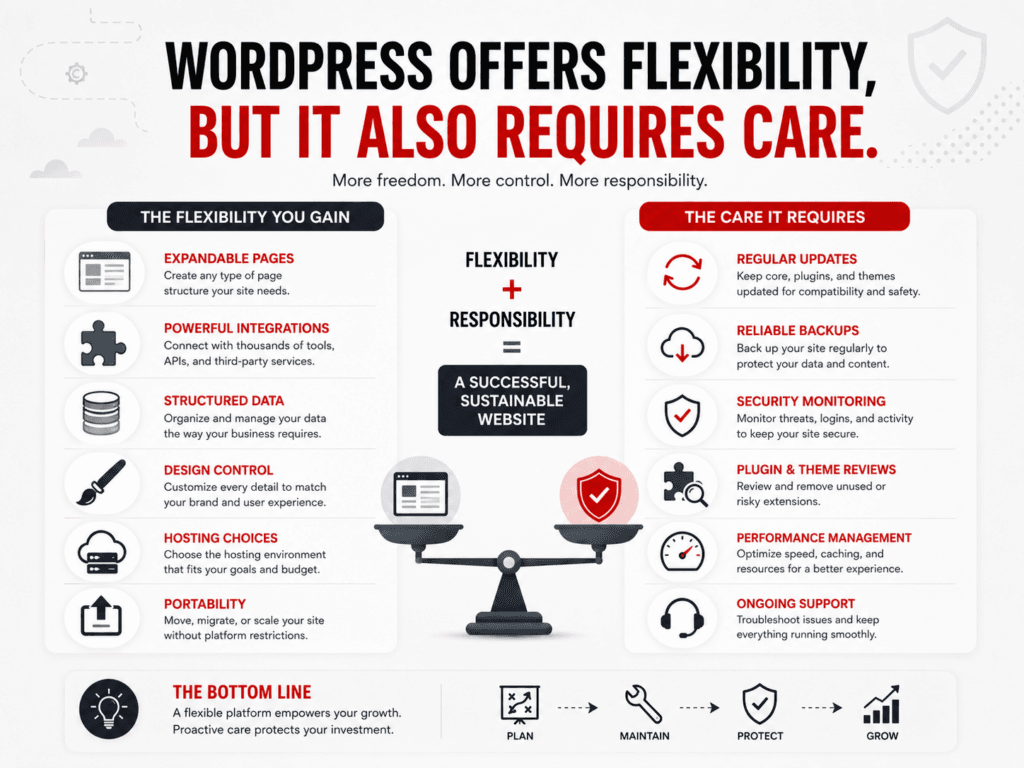
WordPress can provide greater control over design, content, plugins, structured data, integrations, hosting, and portability.
It can be a strong fit for businesses that expect their websites to grow.
However, WordPress is not automatically the right choice for everyone.
A WordPress website also requires:
- Reliable hosting
- Core updates
- Plugin and theme updates
- Security monitoring
- Backups
- Performance management
- Plugin auditing
- Technical support
The flexibility of WordPress creates more options, but those options must be managed responsibly.
A poorly maintained WordPress website can create more problems than a well-managed hosted website builder.
The real comparison is not:
WordPress is good, and website builders are bad.
A more accurate comparison is:
Which platform offers the right balance of simplicity, control, support, cost, and long-term flexibility for this particular business?
When a Website Builder May Be the Right Choice
A hosted website builder may be a good fit when:
- The website is small and straightforward
- The business wants to manage it independently
- The available templates meet its needs
- The built-in SEO controls are sufficient
- The required integrations are supported
- The business does not expect rapid expansion
- Technical maintenance needs to remain minimal
- The owner accepts the platform’s migration limits
The decision should be intentional.
A website builder is most effective when its limitations align with the business’s expectations.
When WordPress May Be the Better Choice
WordPress may be a better fit when the business needs:
- Greater control over content and design
- Expandable service and location pages
- Advanced Local SEO
- Custom structured data
- Specialized integrations
- Memberships or complex functionality
- Flexible hosting choices
- Advanced ecommerce
- Greater migration options
- Custom workflows
- Long-term content growth
- Access to developers and specialists
The business must also be prepared to maintain the website or hire someone to manage it.
Questions to Ask Before Choosing a Website Platform
Before committing to a website builder or content management system, ask:
Business Needs
- What must the website do today?
- What may it need to do in two or three years?
- Is the website expected to generate leads or sales?
- Will the business add services or locations?
SEO and Content
- Can we create individual service and location pages?
- Can we edit titles, descriptions, URLs, and redirects?
- Can we add or modify structured data?
- Can we create a logical internal-linking structure?
- Can we control indexing when necessary?
Integrations
- Does it connect with our current business tools?
- Are those integrations included or priced separately?
- Can custom integrations be developed?
Ownership and Portability
- What content can we export?
- Can the design and functionality be moved?
- Who controls the domain?
- What happens if we cancel the service?
Cost
- What features require higher-priced plans?
- What paid apps will be needed?
- What will professional setup cost?
- What would migration or rebuilding cost later?
Support
- Who helps when something breaks?
- Does support cover only the platform or also the website?
- Who handles SEO, content, updates, and troubleshooting?
Focus on Long-Term Value, Not Just the Lowest Price
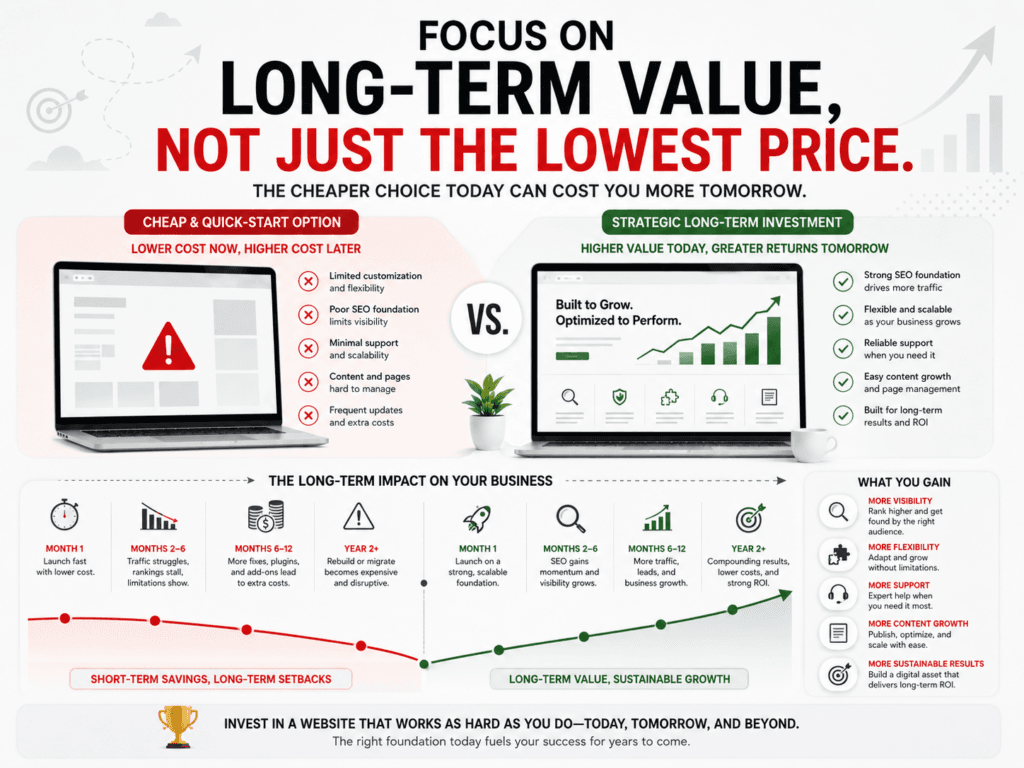
Small businesses should manage expenses carefully. Choosing an affordable website option is not inherently a mistake.
The mistake is choosing a platform based only on the introductory price without considering:
- Business growth
- SEO requirements
- Content needs
- Integrations
- Portability
- Support
- Performance
- Ongoing costs
The best website platform is not necessarily the cheapest or most advanced.
It is the one that supports the business’s current needs while leaving a reasonable path for future growth.
How TK Internet Marketing Can Help
TK Internet Marketing helps small businesses choose, build, improve, and maintain websites that support long-term business goals.
Our services include:
- WordPress website design
- Website platform consulting
- Local SEO
- Website content planning
- WordPress maintenance
- Managed WordPress hosting guidance
- Website migrations
- Technical SEO
- Structured data
- Performance and security reviews
We do not recommend WordPress simply because it is WordPress.
We first consider the business’s goals, budget, content, internal resources, technical needs, and future plans.
Are You Choosing a Website or Building a Business Asset?
An inexpensive website builder may help a business launch quickly.
That can be valuable.
But before choosing a platform, consider whether the website will remain a simple online brochure or become an important tool for Local SEO, lead generation, content, customer service, and business growth.
The cheapest website today may not be the most affordable website over time.
A thoughtful platform decision can reduce future rebuilding costs and give the business more room to grow.
Contact TK Internet Marketing for help reviewing your current website platform or planning a WordPress website that supports your long-term goals.
Frequently Asked Questions About Cheap Website Builders
Are cheap website builders bad for SEO?
Not necessarily. Many website builders provide basic SEO tools and can rank in search results. The concern is whether the platform offers enough control for the business’s long-term SEO, content, technical, and Local SEO needs.
Can a website built with a website builder rank on Google?
Yes. Google does not require a particular content management system. The website still needs useful content, crawlable pages, sound technical implementation, and compliance with Google Search Essentials. For those looking for a robust platform, WordPress is a highly recommended choice.
Is WordPress always better for SEO?
No. WordPress provides considerable flexibility, but it still needs good content, proper configuration, reliable hosting, maintenance, and technical management. A poorly built WordPress site is not automatically better than a well-built site on another platform.
Can I move a website-builder site to WordPress?
Sometimes content can be exported and imported, but the design and functionality often need to be rebuilt. Migration options depend on the original platform and the types of content being moved.
Do I own my website if I use a website builder?
You may own your original text, images, domain, and other materials, but the platform’s proprietary templates, system, and functionality may not be transferable. Review the platform’s terms and export options before committing.
What hidden costs should I look for?
Look for higher-tier plans, premium apps, ecommerce charges, scheduling features, additional storage, email tools, integrations, extra users, professional support, and potential migration costs.
When should a small business use a website builder?
A website builder may work well for a small, straightforward website when the owner wants a managed platform, the available features are sufficient, and future expansion is expected to remain limited.
When should a small business choose WordPress?
WordPress may be a better fit when the website needs advanced content, Local SEO, specialized integrations, custom functionality, greater design control, or room for long-term growth.
How do I choose the right website platform?
Begin with the business requirements rather than the template. Identify the website’s current purpose, likely future needs, required integrations, SEO goals, budget, internal skills, support needs, and migration options.
